


TP-Link BE800 | BE19000 Tri- Band Wi-Fi 7 Router | Archer BE800
TP-Link BE800 | BE19000 Tri- Band Wi-Fi 7 Router | Archer BE800
Couldn't load pickup availability


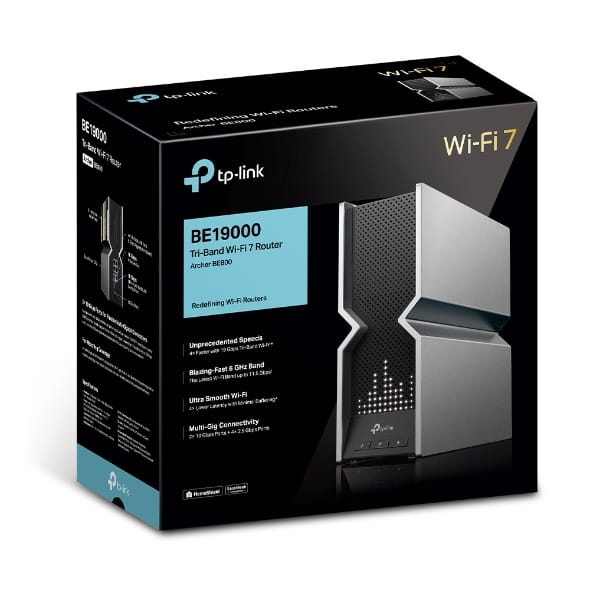
TP-Link BE800 | BE19000 Tri- Band Wi-Fi 7 Router | Archer BE800
Archer BE800 BE19000 Tri-Band Wi-Fi 7 Router
Description:
Redefining WiFi Routers: With powerful WiFi 7 performance, lightning-fast wired connections, brand-new design, and LED screen.
Lightning-Fast 19 Gbps Tri-Band WiFi 7: Enables your devices to run at full speed. Enjoy fluent 4K/8K streaming, immersive AR/VR gaming, and lightning-fast downloads.†‡
Multi-Link Operation (MLO): Increases throughput, reduces latency, and improves reliability for emerging applications.‡
Dual 10G Ports: 1× 10 Gbps Ethernet/Fiber Combo WAN/LAN port + 1× 10 Gbps WAN/LAN port + 4× 2.5 Gbps ports + 1× USB 3.0 port ensure max flexibility and boosted throughput.
Maximized Coverage: Proprietary WiFi optimization and 8× optimally positioned antennas along with Beamforming deliver more capacity, stronger and more reliable connections, and less interference.
EasyMesh-Compatible: Works with EasyMesh routers and range extenders to form seamless whole home Mesh WiFi, preventing drops and lag when moving between signals.
TP-Link HomeShield: Enhanced security defends against the latest cyber threats.*
Easy and Fun to Use: Conveniently manage everything with the Tether app, and visually display the time, weather, and playful graphics with the LED screen.

TP-Link Archer BE800 – BE19000 Tri-Band Wi-Fi 7 Router
Wireless
Wi-Fi Speeds (BE19000)
◆ 6 GHz: 11520 Mbps (802.11be)
◆ 5 GHz: 5760 Mbps (802.11be)
◆ 2.4 GHz: 1376 Mbps (802.11be)
Wi-Fi Range
◆ Ideal for 4-Bedroom Houses
◆ 8× Optimally Positioned Antennas
◆ Beamforming
◆ High-Power FEM
Wi-Fi Capacity
◆ Up to 100 Devices
◆ Tri-Band Bandwidth Allocation
◆ 4×4 MU-MIMO
◆ OFDMA
◆ Airtime Fairness
◆ DFS
◆ 12 Streams
Working Modes
◆ Router Mode
◆ Access Point Mode
Advanced Features
◆ Multi-Link Operation (MLO)
◆ 320 MHz Channel
◆ 4K-QAM
◆ Multi-RUs
◆ EasyMesh Compatible
◆ Works with Alexa & Google Assistant
◆ Dedicated IoT Network
Security
Network Security
◆ SPI Firewall
◆ Access Control
◆ IP & MAC Binding
◆ Application Layer Gateway
HomeShield Security
◆ Real-Time IoT Protection
◆ Malicious Site Blocker
◆ Intrusion Prevention System
◆ DDoS Attack Prevention
◆ Home Network Scanner
Guest Networks
◆ 1× 6 GHz Guest Network
◆ 1× 5 GHz Guest Network
◆ 1× 2.4 GHz Guest Network
VPN Support
VPN Server:
◆ OpenVPN
◆ PPTP
◆ L2TP
◆ WireGuard
VPN Client:
◆ OpenVPN
◆ PPTP
◆ L2TP
◆ WireGuard
Wi-Fi Encryption
◆ WPA
◆ WPA2
◆ WPA3
◆ WPA/WPA2-Enterprise (802.1x)
Hardware
Ethernet Ports
◆ 1× 10 Gbps WAN/LAN
◆ 1× 10 Gbps SFP+/RJ45 Combo WAN/LAN
◆ 4× 2.5 Gbps LAN
USB
◆ 1× USB 3.0
Supported Formats: NTFS, exFAT, HFS+, FAT32
Supported Functions: FTP Server, Media Server, Samba Server
Buttons
◆ WPS
◆ LED
◆ Wi-Fi
◆ LED Screen: Yes
◆ Power: 15V ⎓ 5A
Software
Protocols
◆ IPv4
◆ IPv6
Parental Controls (HomeShield)
◆ Custom Profiles
◆ Content Filter Library
◆ Family Time / Bedtime / Off Time
◆ Time Rewards
◆ Online Time Ranking
◆ Pause Internet
◆ Weekly & Monthly Reports
WAN Types
◆ Dynamic IP
◆ Static IP
◆ PPPoE
◆ PPTP
◆ L2TP
QoS
◆ QoS by Device
Cloud Services
◆ Auto Firmware Upgrade
◆ TP-Link ID
◆ DDNS
NAT Forwarding
◆ Port Forwarding
◆ Port Triggering
◆ DMZ
◆ UPnP
IPTV
◆ IGMP Proxy
◆ IGMP Snooping
◆ Bridge
◆ Tag VLAN
DHCP
◆ Address Reservation
◆ DHCP Client List
◆ Server
DDNS
◆ TP-Link
◆ NO-IP
◆ DynDNS
Management
◆ Tether App
◆ Web Interface
Physical
◆ Dimensions (W × D × H): 302 × 262.5 × 96 mm
(11.9 × 10.3 × 3.8 in)
Environment
◆ Operating Temperature: 0°C to 40°C
◆ Operating Humidity: 10% to 90% (Non-Condensing)
Certifications
◆ CE
◆ FCC
◆ RoHS
Package Contents
◆ Archer BE800 Wi-Fi 7 Router
◆ Power Adapter
◆ RJ45 Ethernet Cable
◆ Quick Installation Guide