


Baseus SafeJourney Series Wireless CarPlay Adapter
Baseus SafeJourney Series Wireless CarPlay Adapter
Couldn't load pickup availability


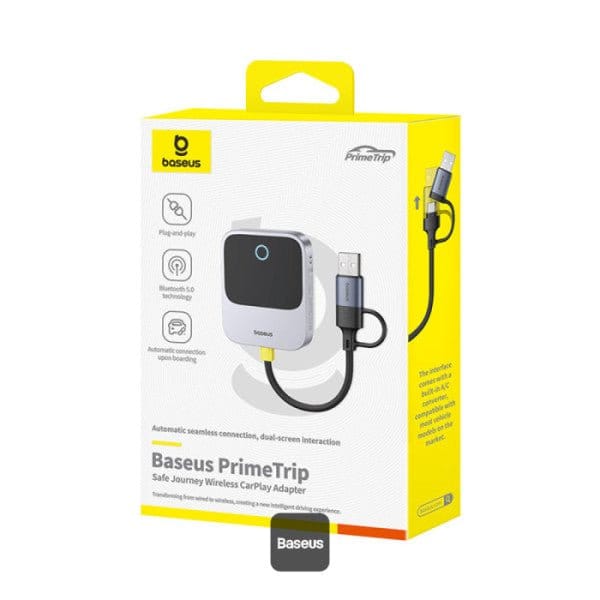
Baseus SafeJourney Series Wireless CarPlay Adapter

Description:
🔗 Baseus Seamless Wireless CarPlay Adapter Experience hands-free driving like never before with the Baseus wireless CarPlay adapter. Effortlessly connect your iPhone 16 Pro Max to your vehicle using Baseus carplay adapter for seamless access to music, navigation, and calls. Supports all vehicles with wireless carplay for maximum convenience.
🚗 Best Baseus CarPlay Wireless Adapter for iPhone The Baseus CarPlay wireless adapter for iPhone is optimized for a hassle-free connection, making it the best carplay wireless adapter for 2024. Plug and play with any compatible vehicle, including Tesla Model Y or Hyundai Ioniq 5, for seamless integration of apps, music, and more. Works with wireless android auto adapter too!
📱 Bluetooth & USB-C CarPlay Adapter for Modern Vehicles The Baseus bluetooth carplay adapter delivers a stable connection with high performance. It includes a USB Bluetooth adapter for car for added flexibility and compatibility with iPhone 15 and. this carplay wireless adapter ensures wireless power on the go.
🎶 Mini Wireless CarPlay Adapter for Easy Streaming Compact yet powerful, the Baseus mini wireless CarPlay adapter fits perfectly into any car, such as the Audi A6 or Toyota Corolla. Offering seamless carplay streaming device performance, it's ideal whether you need a car play adapter or a wireless car play adapter for vehicles like SUVs or sedans.
📺 Baseus Wireless CarPlay Adapter with TV Streaming Enhance your in-car entertainment with the Baseus carplay tv adapter. It's a wireless car play adapter for iPhone 15 Pro Max, making it easier than ever to stream Netflix or YouTube. Turn your car into a hub with this car play wireless adapter, ideal for seamless navigation, calls, and media streaming in cars like the Mercedes-Benz E-Class.
Enable Wireless CarPlay: Convert wired CarPlay to wireless for a clutter-free experience.
Convenience Redefined: Maximize your road trip with seamless wireless connectivity.
One-Piece Design: Durable, stable, and requires less plugging/unplugging.
Gel Pad for Stability: Ensures firm placement and reliable signal connection.
USB-C to USB-A Adapter Cable Included: Compatible with various car setups.
Seamless Auto-Connect: Instantly pairs with iPhone on car startup.
Bluetooth 5.0 : Faster, more stable connection.
Hands-Free Control: Access music, maps, and apps on your car’s display.
Wide Compatibility: Supports iOS 10-18 and 800+ car models (2016+).
Compact Grey Design: Modern, unobtrusive look for any interior.
130


The Baseus SafeJourney Series Wireless Car Play Adapter is the perfect solution for those who want to upgrade their car's CarPlay system easily and conveniently. With a compact design, stable connection and ease of use, this device will help you enjoy the benefits of Car Play without worrying about cables. Equip your car with this modern device to make your driving experience smarter and safer.
Only for iPhone: Car Play is designed exclusively for iPhone users, offering a seamless connection to access apps, navigation, and music for a safer driving experience.
Wireless Car Play Adapter: Tired of dealing with tangled wires while driving? With the apple Car Play wireless adapter, you can convert your existing wired Car Play system to wireless without any hassle. Enjoy all the features of Car Play such as navigation, music playback, Siri, and phone calls, without the need for wired connections. Please note that this dongle is only compatible with Apple Car Play and not with any other system.
Easy to Use: The wireless Car Play adapter has a simple plug and play design that is easy for all motorists to use. There's no need for extra drivers, apps, or complicated system upgrades. After the initial setup, the Car Play wireless adapter will automatically activate the Car Play wireless connection each time the car starts, ensuring that you have a seamless experience every time.
Compatibility with over 800 Car Models: Looking for a apple Car Play wireless adapter that can work with multiple car models? The wireless Car Play adapter is compatible with more than 800 car models. Please note that your car must have a factory wired Car Play system for the adapter to work. You can use our products to upgrade your Car Play to wireless for easy use.
Fully Automated Driving Experience: Once you've installed the apple Car Play wireless adapter, you'll enjoy a fully automated driving experience. The wireless Car Play adapter automatically connects to your iPhone as soon as the car engine starts. The built-in 5Ghz WIFI module will quickly identify your phone and establish a wireless Car Play connection.
1. Insert the device into the original car's CarPlay USB-A/USB-C interface.
2. Pair the device with your phone via Bluetooth. The Bluetooth name is BS-CG027-xxxx.
Note: "xxxx" is a randomly displayed number.
3. After a successful connection, the phone will display the CarPlay interface. Click the button to enterthe CarPlay interface.
LED Indicator Light Effect Description
1. Connection with the data cable: The indicator light flashes blue, indicating that thepower is on but the Bluetooth is not connected.
2. Bluetooth connection: The indicator light turns solid blue, indicating a successful Bluetooth connection.
Device OTA Upgrade
1. insert the product into a USB 5V power supply (as shown in the figure below). After the device ispowered on, use your phone to connect to the device's WlFl. WlFl name: BS-CG027-xxxx,password:88888888. Enter https://192.168.1.101 in the browser to access the backend system.2. Enter the backend system and click "Update" to upgrade the software.
Recommendations for Use
Be used with a cigarette lighterBe used with original CarPlay ports (not recommended during OTA upgrades)
Problem Submission
Enter the backend system to fil in the problem description, click "Submit" and take a screenshot withyour phone to contact the dealer.
Attention
1. Before use, please unpair your phone from the car's original central control Bluetooth.
2. When connecting to Bluetooth for the first time, if a Siri authorization prompt pops up on your phone,please select "Accept" and turn on the settings switch.
3. lf the central control screen still does not display the phone interface after successfully connecting toBluetooth, please open Phone Settings - General - CarPlay - Bluetooth Name, and toggle the CarPlaybutton to turn it on.
Users can confirm whether the car supports carplay through the following methods:
1. In the settings menu of the vehicle system, look for "Mobile Internet", "CarPlay", "Smart Device Management" or similar options to confirm whether there are CarPlay related settings.
2. Connect your iPhone: Use the original Apple Lightning cable to connect your iPhone to your car’s USB port (usually the one with a phone icon or labeled “CarPlay”). If your car supports wireless CarPlay, you can enable wireless CarPlay in your iPhone's settings and make sure your iPhone is paired with the car's Bluetooth.
3. Check the car display: After connecting the iPhone, the Apple CarPlay prompt should pop up on the screen of the car infotainment system. If a prompt pops up, it means your car supports CarPlay.
Specifications
Name
Baseus Safe Journey Series Wireless CarPlay Adapter
Model
Baseus Prime Trip Safe Journey Series / C10745100813-00
Power
Input
5V/1A (Max.)
Build & Design
Material
PC + ABS
Product Dimensions
6.5 × 5.5 × 1.5 cm
Product Weight
51 g
Package Dimensions
16 × 11 × 3 cm
Package Weight
115 g
Connectivity
Bluetooth
Bluetooth 5.0
Auto-Connect
Yes, automatically connects when car starts
Adapter Cable
USB-C to USB-A for compatibility with various car ports
Additional Stabilization
Gel pad included for stable placement and signal integrity
Compatibility
iPhone Compatibility
iOS 10–18 (iPhone only)
Car Model Compatibility
800+ models with factory-wired CarPlay (2016+)
Features
• Plug & Play
• Dual-screen Controls
• Voice Assistant Control + Navigation + Music + Call
• Stable Connection
• Auto-connect
Main Functions
• Converts wired CarPlay to wireless
• Supports hands-free calls
• Supports navigation
• Supports music playback
• Supports app access
In-Car Control
Operate via car’s touchscreen and steering wheel controls
Compatible Cars:
iOS - CarPlay - Available Models - Apple