


Mercusys AX3000 Dual-Band Gigabit WiFi 6 Router | MR80X
Mercusys AX3000 Dual-Band Gigabit WiFi 6 Router | MR80X
Couldn't load pickup availability


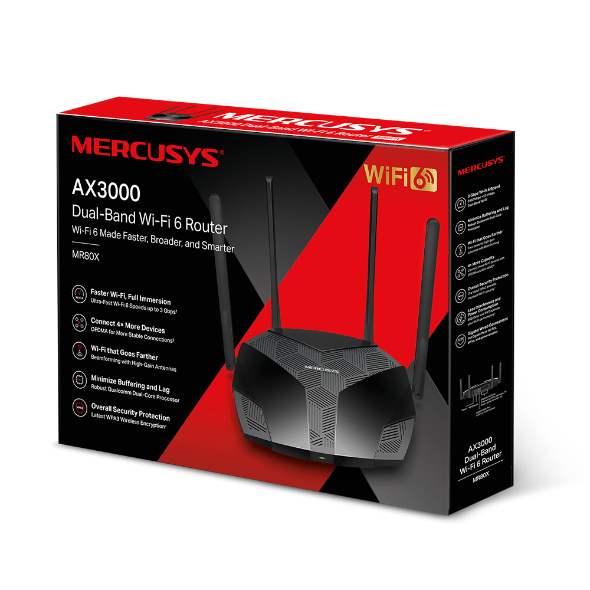
Mercusys AX3000 Dual-Band Gigabit WiFi 6 Router | MR80X
AX3000 Dual-Band Wi-Fi 6 Router
Description:
OPTIMAL WIFI 6 SPEEDS – Optimal WiFi 6 speeds reaching up to 3 Gbps for faster browsing, streamings, and downloading, all at the same time.
MORE DEVICES, MORE FUN – Supports MU-MIMO and OFDMA to reduce congestion and quadruple the average throughput.
WiFi THAT GOES FARTHER – 4× multi-directional high-gain antennas with Beamforming boost stable connections throughout your home for strong WiFi signals in every corner
OVERALL SECURITY PROTECTION – The latest WPA3 provides improved WiFi security
GIGABIT WIRED CONNECTIONS – Make full use of your internet access and transfer data at dizzying speeds for peak performance
ECO-FRIENDLY POWER SAVING – Target Wake Time (TWT) reduces power consumption for your mobile and IoT devices during data transmissions
LESS WIFI INTERFERENCE – Minimizes the interference from neighboring signals to improve transmission efficiency with BSS coloring
SMART CONNECT – Intelligently chooses the best available band for each device


MERCUSYS MR80X – AX3000 Dual-Band Wi-Fi 6 Router
Wireless
Wi-Fi Class
◆ AX3000
Wi-Fi Speeds
◆ 5 GHz: 2402 Mbps
◆ 2.4 GHz: 574 Mbps
Wireless Standards
◆ 802.11ax/ac/a/b/g/n
◆ Max Channel Width: 160 MHz
◆ Max Wi-Fi Modulation: 1024-QAM
◆ Wireless Security: WPA / WPA2 / WPA3
Reception Sensitivity
5 GHz:
◆ 11a 6Mbps: -97 dBm
◆ 11a 54Mbps: -79 dBm
◆ 11ac VHT20 MCS8: -75 dBm
◆ 11ac VHT40 MCS8: -71 dBm
◆ 11ac VHT80 MCS8: -67 dBm
◆ 11ax HE20 MCS11: -67 dBm
◆ 11ax HE40 MCS11: -64 dBm
◆ 11ax HE80 MCS11: -61 dBm
2.4 GHz:
◆ 11g 6Mbps: -97 dBm
◆ 11g 54Mbps: -79 dBm
◆ 11n HT20 MCS7: -77 dBm
◆ 11n HT40 MCS7: -74 dBm
Wireless Functions
◆ Guest Network
◆ Smart Connect
◆ Wireless Schedule
◆ WPS
◆ AP Isolation
◆ Airtime Fairness
◆ OFDMA
◆ BSS Color
◆ Beamforming
Hardware
◆ Dimensions: 208.8 × 171.6 × 41.7 mm
◆ Interfaces: 1× Gigabit WAN, 3× Gigabit LAN
◆ Antennas:
– 2× 5 GHz External (5 dBi)
– 2× 2.4 GHz External (5 dBi)
◆ Button: 1× WPS/Reset
◆ LED: 1× SYS
◆ Installation: Desktop / Wall Mount
Power
◆ Input: 100–240V, 50/60Hz
◆ Output: 12V / 1.5A
Software
Operation Mode
◆ Router Mode
◆ Access Point Mode
WAN Modes
◆ Dynamic IP
◆ Static IP
◆ PPPoE
◆ PPTP
◆ L2TP
NAT Forwarding
◆ Port Forwarding
◆ Port Triggering
◆ DMZ
◆ UPnP
Protocols
◆ IPv4
◆ IPv6
IPTV
◆ IGMP Proxy
◆ IGMP Snooping
◆ Bridge
◆ Tag VLAN
Guest Network
◆ 2.4 GHz Guest Network
◆ 5 GHz Guest Network
Parental Controls
◆ Profile Settings
◆ Time Control
◆ Pause Internet
◆ Website Filtering
DHCP
◆ Server
◆ Address Reservation
◆ DHCP Client List
DDNS
◆ MERCUSYS
◆ NO-IP
◆ DynDNS
VPN
VPN Server: OpenVPN, PPTP, L2TP/IPSec, WireGuard
VPN Client: OpenVPN, PPTP, L2TP/IPSec, WireGuard
◆ Kill Switch: Supported
QoS
◆ Time Settings
◆ Priority Control
Security
◆ SPI Firewall
◆ Access Control
◆ IP & MAC Binding
ISP Features
◆ CWMP
◆ ISP Preset (Agile Config)
◆ Superadmin
System Tools
◆ Firmware Upgrade
◆ Backup & Restore
◆ Administration
◆ System Log
◆ Time & Language Settings
◆ Reboot
◆ Diagnostics: Ping, Traceroute
◆ LED Control / Night Mode
Device Management
◆ MERCUSYS App
◆ Web Interface
◆ MERCUSYS ID (Cloud)
Network Services Enabled by Default
◆ Web Server (HTTP/HTTPS) – Port 80/443 (TCP)
◆ DHCP Server – Port 67 (UDP)
◆ DNS – Port 53 (TCP & UDP)
◆ App Management – Port 20001 (TCP), 20002 (UDP)
Physical & Logistics
◆ Retail Package Dimensions: 389 × 290 × 67 mm
◆ Units per Carton: 10
◆ Carton Dimensions: 590 × 400 × 345 mm
Environment
◆ Operating Temperature: 0°C to 40°C
◆ Operating Humidity: 10%–90% Non-Condensing
◆ Storage Humidity: 5%–90% Non-Condensing
Package Contents
◆ AX3000 Wi-Fi 6 Router MR80X
◆ Power Adapter
◆ RJ45 Ethernet Cable
◆ Quick Installation Guide